Colleague AI
My role: UX Research, UX Design, UX Operations
Duration: 6 months
Research Type: Generative research
Research Method: Contextual Inquiry + In-depth Interview, Competitive Analysis, Co-Design
Project type: Team project (Team of 4)
Tools: Google form, Miro, Figma, Qualtrics, Google G-Suite
Stakeholder: University of Washington College of Education
Background and Goal
Colleague AI is an AI-powered lesson recommendation platform for K–12 teachers, built with UW's Education Policy Analytics Lab under an NSF grant.
As the primary researcher on a team of 4, I owned the full research lifecycle, planning, interviews, co-design, usability testing, and synthesis.
Problems
“It would be great to have a centralized platform where I can find resources in one place.”
-
Teachers weren't struggling to find resources, they were overwhelmed by them across too many disconnected tools. But as we introduced AI recommendations, a deeper need surfaced: teachers didn't want more options, they wanted vetted ones they could trust.

Process Overview
For this project, I approached with five steps to understand K-12 workflows that led to design solution.
Final Design
Research
Usability
Prototype
Planning
Contextual Inquiry
Interview
Competitive Analysis
Co-Design
Persona
Sketches
Storyboard
Medium - Fidelity
Assumption & Questions
Usability Testing
High-Fidelity
Research Methods
Contextual Inquiry + Interview
During the sessions, teachers screen-shared and walked through their lesson planning process including their experience using online platforms and educational tools that aid in their teaching.
Competitive Analysis
Reviewed education platforms to identify product gaps, strengths and weaknesses, and main differentiators.
Co-Design
After discovering pain points, and needs, and identifying opportunities through our research, conducted remote co-design sessions with K-12 teachers.
Key takeaway:
-
K-12 Teachers want to adopt new technology quickly and effectively.
-
They need support with vetting content for alignment with educational standards.
-
Building interactive lessons and that boost student engagement.
-
Tailoring materials to meet varied student needs.
-
Teachers need tools that enable filtering and customizing materials for diverse learners.
-
Sharing resources for collaboration with peers.
Persona
Based on our research findings, I created detailed personas representing typical K-12 educators. Each persona encapsulated their motivations, challenges, and goals, providing a holistic view of our target users. This helped our team to empathize with educators' needs and align the platform features accordingly.

Sketch and Storyboard
After synthesizing the data, I created an affinity map to identify emerging themes, which then informed the development of an empathy map. Based on these insights, I sketched ideas and visualized the user journey as part of the ideation process.


Usability Evaluation
For the usability evaluation, I created a medium-fidelity prototype and re-invited six K–12 teachers. During the sessions, I aimed to evaluate the design’s intuitiveness and effectiveness in supporting lesson planning.
I used 4 user flows to conduct usability testing with participants.
- Flow 1: Initial landing page review
-
Flow 2: Finding and Saving lesson plan
-
Flow 3: Editing lesson plan
-
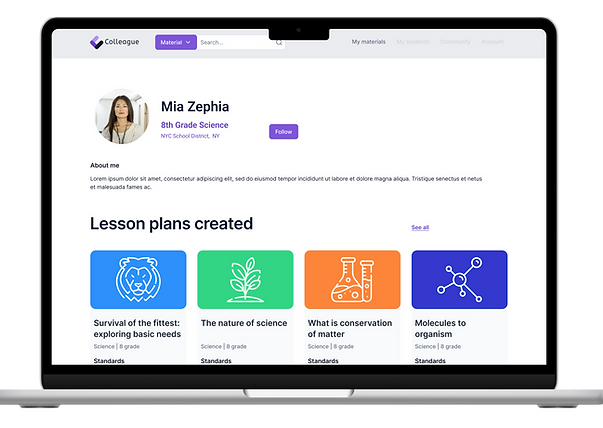
Flow 4: Leave feedback and follow creator
Key takeaway:
-
Need to avoid unfamiliar jargon
-
Data use & privacy
-
Navigation & search
-
Clear feedback


